Wedding deadlines are spread over a year or more, and most of them don’t come with a reminder. A supplier balance due in February is easy to forget in November.
Here are the dates worth watching, and how to get them into the calendar you already check every day.
Wedding HQ ProThe Wedding HQ steps in this guide need Wedding HQ Pro, a one-off A$39 upgrade for both of you. What's included
The deadlines that catch couples out
- Your Notice of Intended Marriage. It must be with your celebrant at least one month before the wedding. Miss it and you can’t legally marry on the day without special approval.
- Supplier balances. Most are due two to six weeks before the wedding, often all in the same fortnight. A late payment can put a booking at risk.
- Deposits to hold a date. Popular suppliers will only hold a date for a few days without one.
- Your RSVP date, and final numbers for the caterer soon after.
- Attire orders. Dresses and suits can take months to arrive, plus time for fittings.
- Bookings that sell out, such as accommodation blocks near the venue, or transport on a Saturday in spring.
Our wedding planning checklist has all of these in order, with due dates worked out from your wedding date.
Put your plan in your calendar
With Wedding HQ Pro, you can add your plan to Google Calendar, Apple Calendar or Outlook. It isn’t a one-off export: your calendar keeps checking for changes, so it stays in step with your plan.
Your calendar shows:
- the wedding day itself
- every open checklist task that has a due date, on that date
- every payment still owing, on its due date, with the amount and supplier
- the run of the day, at the right times on the wedding day
Tick off a task or pay a balance in full, and it drops off your calendar. Change your wedding date, and everything moves.
How to set it up
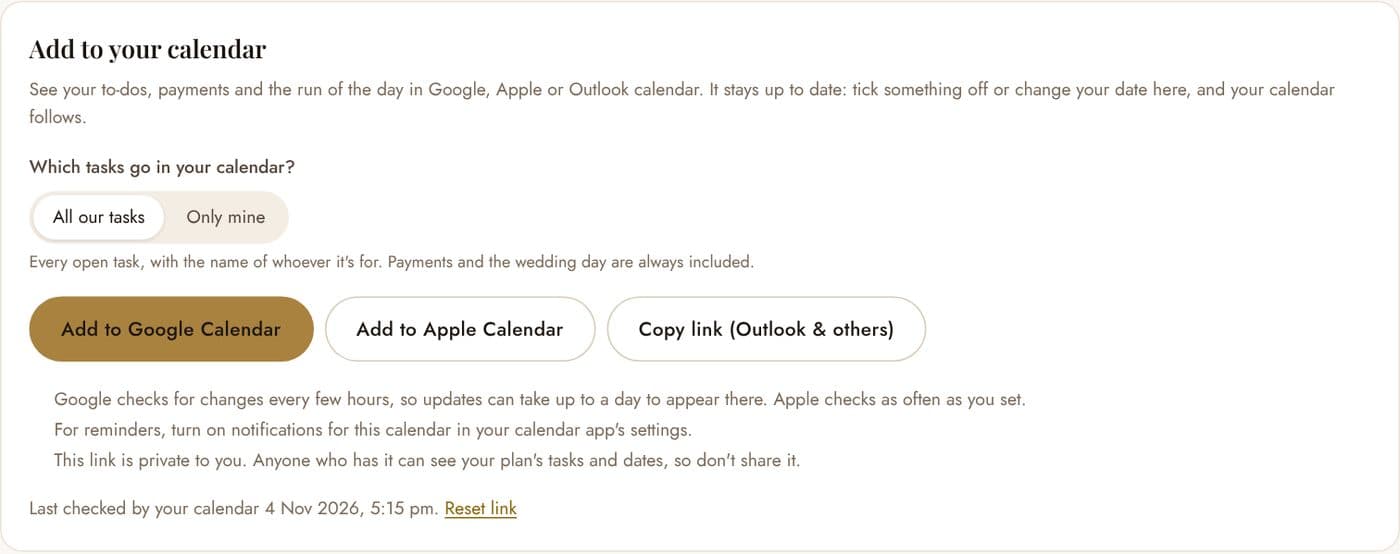
- Open Settings and find Add to your calendar, then choose Set up calendar sync.
- Choose which tasks to include: All our tasks, with the name of whoever each one is for, or Only mine, which shows yours and the ones you share. Payments and the wedding day are always included.
- Add it to your calendar: Add to Google Calendar, Add to Apple Calendar, or Copy link for Outlook and other calendar apps.
Each of you sets up your own, so you can each choose what you see. Apple Calendar checks for changes as often as you set it to. Google checks every few hours, so an update can take up to a day to appear there.
Reminders
Tasks and payments come with a reminder at 9 am the day before they’re due. To get them, turn on notifications for this calendar in your calendar app’s settings.
Want to split the to-dos first? See how to split wedding planning tasks with your partner.
Plan it together in Your Wedding HQ
Start free with the checklist, budget, guest list and run of the day. Upgrade to Wedding HQ Pro whenever you're ready: one payment of A$39 for both of you.