The guest list drives almost everything else: the venue you need, the catering bill, the invitations. It’s also where most of the hard conversations happen.
Here’s a calm way to build it, fit it to your venue, and keep track of RSVPs and dietary needs as replies come in.
FreeEverything in this guide is free in Your Wedding HQ.
1. Agree on a number first
Before anyone writes a name down, agree on roughly how many guests you’re planning for. It comes from two places: your budget (catering is charged per head) and your venue’s capacity. If you haven’t booked a venue yet, settle on a range and let that guide which venues you look at.
2. Think in invites, not just names
An invitation goes to a household: a couple, a family, a friend and their partner. Listing guests that way makes it easy to count seats, address invitations and track replies. For each invite, note:
- everyone on it, including children and any plus-one
- whose side they’re on: yours, your partner’s, or both
- a group, such as family, uni friends or work
- an email or mobile, if you’ll send invitations online
3. Sort everyone into priorities
This is what takes the heat out of the conversation. Instead of arguing about each name, put every invite into one of three tiers:
- Must invite: immediate family and the people you can’t imagine the day without.
- Would love to: close friends and extended family.
- If numbers allow: everyone you’d happily invite if there’s room.
Then add up the seats tier by tier. If the first two tiers fit your number, you’re done. If they don’t, you know exactly where the line falls, and you can decide together where to trim.
4. Track RSVPs and dietary needs
Once invitations go out, keep one list of who’s attending, who’s declined and who you’re still waiting on, along with dietary needs. Your caterer will want final numbers and dietary requirements about three weeks before the wedding, and that list is also the start of your seating plan.
Build your guest list in Your Wedding HQ
The guest list in Your Wedding HQ is free and works the way described above.
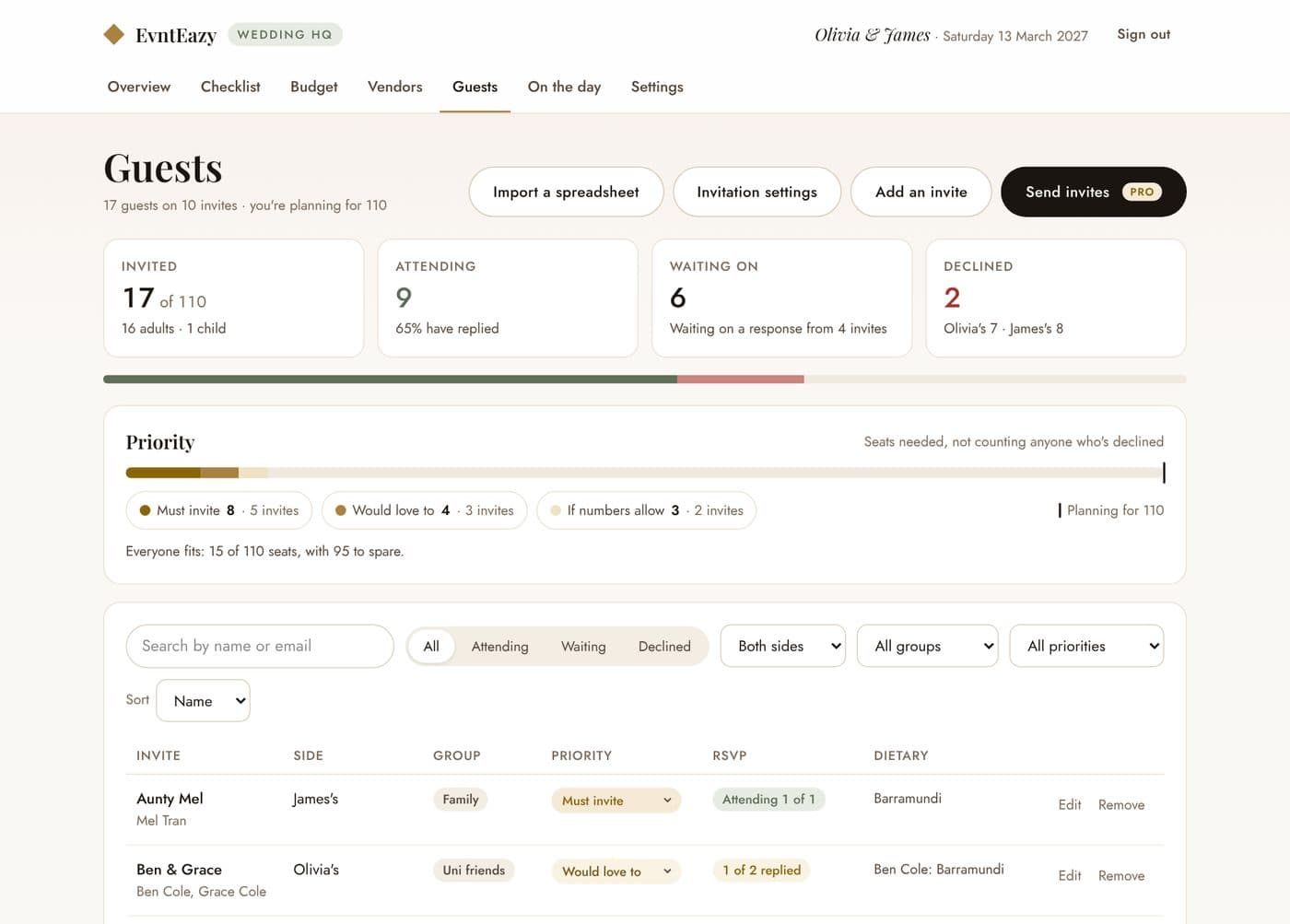
- Add your guest count in Settings. That’s the number you’re planning for.
- Add invites one by one, or import a spreadsheet (Excel or CSV). The import matches your columns, puts people into households and catches anyone who’s on it twice. Nobody is emailed. No spreadsheet yet? The empty Guests tab has a template to download.
- For each invite, set the side, group and priority, and add each person with their email, mobile, dietary needs, and whether they’re a child or a plus-one.
- Record RSVPs as replies come in.
The Guests tab then shows you:
- how many are invited, attending, still to reply and declined, and the split between your two sides
- the seats each priority tier needs, against your guest count, not counting anyone who’s declined
- sorted by priority, exactly where the line falls if you’re over
- search and filters by RSVP, side, group and priority
Notes on an invite are only seen by the two of you. When it’s time to send numbers to the caterer or start the seating plan, export the whole list to a CSV file.
Plan it together in Your Wedding HQ
A shared checklist, budget tracker, guest list and run of the day, free forever. No credit card.