Enquiries arrive through Instagram DMs, website forms, referrals and the occasional phone call. If they live in five different inboxes, some get forgotten. The Lead Pipeline puts every enquiry on one board so you can see who needs a reply, who’s weighing up your proposal, and who’s ready to book.
Professional+Available on Professional and Agency plans. Compare plans
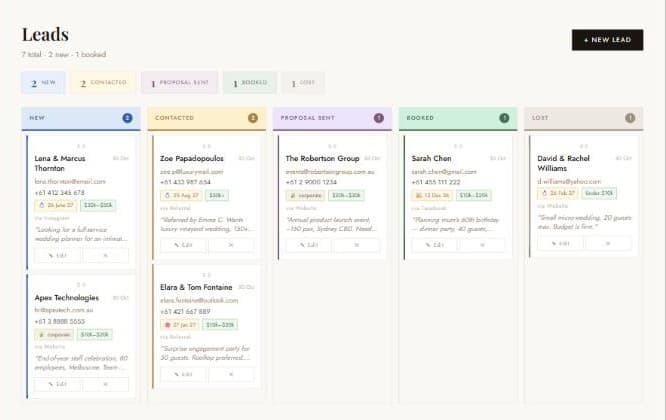
The five stages
- New: an enquiry you haven’t replied to yet.
- Contacted: you’ve replied or had a first call.
- Proposal Sent: your quote or proposal is with the client.
- Booked: they’ve said yes.
- Lost: they chose someone else, or the event didn’t go ahead.
The counters above the board show how many leads sit in each stage, and the heading shows your totals, such as “7 total · 2 new · 1 booked”.
Add a lead
- Click Leads Pipeline in the sidebar, then + New Lead.
- Enter the client’s Name (the only required field), Email and Phone.
- Choose the Event Type and, if they’ve given one, the Event Date.
- Pick a Budget Range: Under $10k, $10k–$20k, $20k–$30k, $30k–$50k or $50k+.
- Record the Source: Instagram, Facebook, Referral, Website, Walk-in or Other. Over time this shows you which channels bring your best clients.
- Paste their enquiry into Message / Notes, then save. New leads start in the New column.
Move leads through the pipeline
Drag a card from one column to the next as the conversation progresses. You can also click ✎ Edit on a card to change its status or update details, such as a confirmed date or a revised budget.
Each card shows the client’s contact details, event date, budget range, source and the start of their message, so you can prepare for a follow-up call without opening anything.
Turn a booked lead into an event
This is where the pipeline saves the most time.
- Drag the lead to Booked (or set the status to Booked in Edit).
- EvntEazy asks whether you’d like to create the event now. Click Create Event.
- The New Event form opens with the client’s name, event type, date, contact person, email and phone already filled in. The source, budget range and original enquiry are copied into the notes.
- Add the venue and budget, review the starter checklist, and click Create Event.
No retyping, and the enquiry history stays with the event. For a walkthrough of the rest of the form, see How to create your first event.
Keep an eye on the pipeline
- Your dashboard shows open leads and your most recent enquiries with their stage.
- Analytics summarises your lead pipeline alongside revenue and task health.
- Keep Lost leads rather than deleting them. They show how many enquiries you convert and where the ones you lose come from.
Which plans include the Lead Pipeline?
The Lead Pipeline is part of the Professional and Agency plans. Compare plans.
Try it on your own events
Explore the live demo with sample data, or start free with one active event. No credit card required.
Questions? Email info@evnteazy.com or use Support in your dashboard. We read every message.